
Most often, when there are echo issues with a headset, your callers will be reporting that they hear an echo.
First, try a different configuration setting on the wireless headset base (pictures below): try cycling through the settings from A-G, until you find one where the echo goes away and the optimal sound is heard.
'A' is most commonly used.
Also, try setting the speaker and microphone volume levels on the base to what is in the picture: speaker to '3', microphone to '3'.
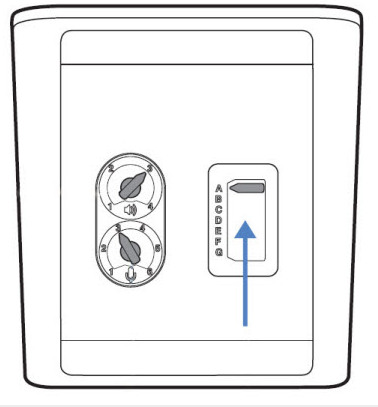
A rule of thumb is that it is better to increase the volume on whichever amplifier is closest to the user. It is good to set everything to a 'baseline' medium setting, and then adjust from there:
- set the phone-based settings to medium
- set the headset 'base' settings to medium
- set the wireless headset settings to medium.
If the 'caller voice' echo problem persists, the microphone may still be too high (which allows it to pick up the sounds coming from the microphone). Try lowering the 'microphone' setting on the base a bit further. If your speaking volume is then too low for your caller, you can also adjust the position of the headset to ensure the microphone is two finger’s width from your mouth.
If you hear an echo, similar steps should help - decrease the phone-side setting to medium, or a bit lower, and set the speaker volume on the headset to medium. Then, adjust from there using the 'rule of thumb' above.
There is a video on this subject available here:
https://www.youtube.com/watch?v=xNGxmQ2257w
Comments
0 comments
Article is closed for comments.